
Quick answer: what are the Froststrap features?
The main Froststrap features fall into five groups: bootstrapper updates, local mods, supported Fast Flags, release channels and reset or verification tools. They work around the Windows Roblox client and do not replace Roblox accounts, experiences or platform services.
Treat them as configuration tools, not gameplay promises. A mod changes a local asset, a Fast Flag requests a recognized client option, and a channel selector chooses a project build.
| Feature group | What it can do | What it cannot prove |
|---|---|---|
| Launch and updates | Install, update and start Roblox through Froststrap | That Roblox itself is available or every update is trouble-free |
| Mods and Mod Generator | Prepare selected local cursor, UI, texture or sound assets | That a community package is safe or compatible forever |
| Fast Flags | Request supported client configuration values | That an old flag still exists or improves performance |
| Channels | Choose a stable or deliberately tested preview line | That a beta is more secure or faster than stable |
| Verification and reset | Compare source, release, settings and rollback steps | That one hash makes every future file safe |
Launch, update and maintenance controls
The bootstrapper organizes a Windows installation, applies selected options and starts Roblox with the current local configuration.
The release checked on October 8, 2026 is v2.0.5. Its Windows asset is Froststrap-windows-x64.msi, published October 7, 2026, with a published SHA-256 digest.
Mods and the Froststrap Mod Generator
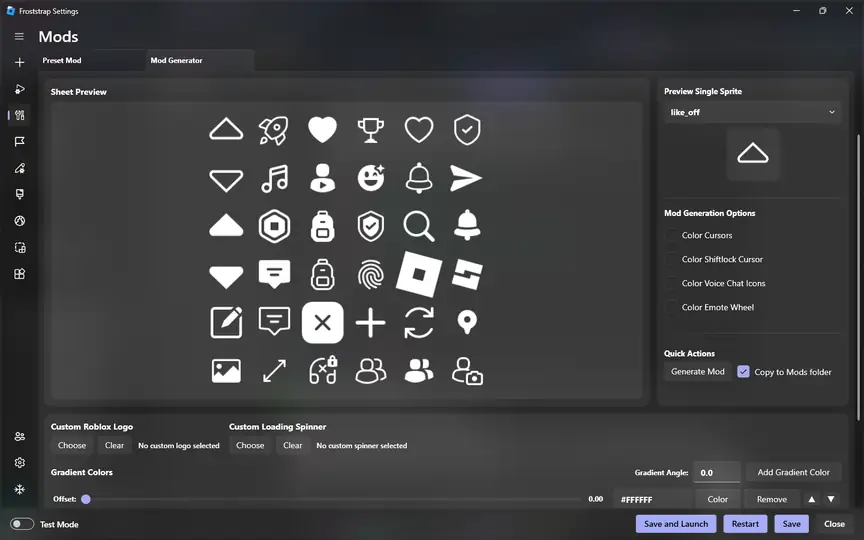
Mods are local files that Roblox can load through Froststrap. The Mod Generator supports selected cosmetic assets such as cursors, UI graphics, sounds, textures and loading visuals.
Inspect imported files before enabling them. Reject packages with executables, scripts, password-protected downloaders or unrelated extensions.
1. Open the Mods area
Use the settings page in the installed release and choose Mod Generator or My Mods. If a control is absent, do not follow an old tutorial that assumes it is still supported.
2. Choose one known asset
Use a preset or a file type the generator explicitly requests. Keep the package small so a problem has a clear cause.
3. Preview and apply
Review the preview, set the intended Player or Studio target and copy the result only after checking the file list.
4. Test and roll back
Launch Roblox once, confirm the exact visual change, then disable or remove the mod before adding another one.
My Mods, targets and reversible configuration
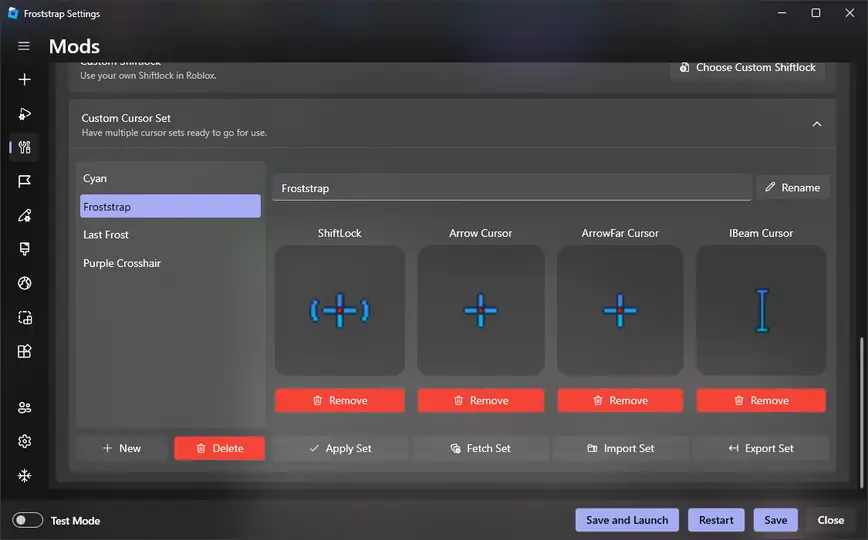
My Mods manages local packages. Depending on the release, it can list packages, toggle them, set a target, change priority and open the selected folder.
Use priority only when the interface explains the order for two supported packages. It cannot resolve incompatible files.
Fast Flags and the supported allowlist
Fast Flags are version-sensitive client configuration values. They matter only while the Roblox client recognizes them.
Record a baseline, change one supported value, launch the same experience and compare the same metric. Restore the default if there is no clear improvement or stability worsens.
| Check | Why it matters | Safe next step |
|---|---|---|
| Current allowlist | The client may remove old names | Use the current guide and release notes |
| One change | Multiple flags hide the cause | Save the old value before testing |
| Same experience | Workloads differ between games | Compare with a consistent session |
| Clean rollback | A failed flag can affect launch | Restore defaults and relaunch |
Stable, beta and release-channel choices
Channel controls suit a specific test case; stable is the sensible baseline for daily play and launch diagnosis.
A preview label is not a security certificate or a speed guarantee. If a channel will not save or stops Roblox, disable optional settings and compare the stable release.
Name the reason
Write the issue or feature you intend to test. Without a concrete reason, remain on stable.
Record the baseline
Save the current tag, Windows version, enabled mods and important values without sharing account data.
Test from defaults
Launch the preview once with optional changes disabled so the channel itself is the variable.
Keep rollback ready
Return to the verified stable asset if the preview adds a new failure or does not reproduce the issue.
Performance expectations and honest measurements
Some users choose Froststrap options hoping for smoother Roblox performance, but FPS, frame pacing and ping have many causes.
Keep the same experience, graphics settings, power state and test duration. Record one change, revert instability and compare the standard launcher when possible.
- Keep the same Roblox experience and approximate test route.
- Change one Froststrap option at a time and save the previous value.
- Compare plugged-in and battery tests separately on laptops.
- Stop if a setting creates crashes, missing visuals or account prompts.
- Restore defaults before asking for support or changing channels.
Security, source verification and privacy
Use a source-first workflow: open the public GitHub repository, match the release tag and filename, compare the published digest, and keep Defender and SmartScreen enabled.
Froststrap features do not need a Roblox password, session cookie or two-factor code. Remove personal paths and account identifiers from issue reports.
- Verify Froststrap/Froststrap and the exact release tag.
- Keep the original asset name and compare its byte size and SHA-256.
- Reject installers that request passwords, tokens or unrelated software.
- Use documented reset controls before deleting broad user-profile folders.
- Report reproducible problems without cookies, credentials or private logs.
Compatibility limits and common failure patterns
A visible feature can still depend on the Roblox client, Windows policy or the current release. Mods may stop matching after an asset layout change.
Classify the failure stage: install, saved setting, Roblox update, client start, or one versus every experience. Return to stable defaults and undo the newest optional change.
| Symptom | First comparison | Avoid |
|---|---|---|
| Mod is not visible | Check target, file type and current client version | Adding many packages at once |
| Flag has no effect | Check the current allowlist and one-value test | Trusting an old preset |
| Channel reverts | Test stable with optional settings disabled | Forcing an unavailable value |
| Roblox will not start | Restore defaults and compare the normal launcher | Disabling Windows protection globally |
Which Froststrap feature should you use first?
Choose the smallest feature that answers your question. New users should verify the stable release and complete one default launch before customizing.
Use the Mods guide for local assets, Fast Flags for the allowlist, Download for release facts and GitHub for source verification. Changelog and Troubleshooting help with regressions.
| Your goal | Start here | Next link |
|---|---|---|
| Install or update | Download and verify the stable asset | How to install Froststrap |
| Change a local look | Use Mod Generator with one small asset | Froststrap Mods |
| Test a client option | Read the Fast Flags allowlist | Roblox Fast Flags |
| Investigate a regression | Read the tag and reproduce from defaults | Changelog and troubleshooting |
Froststrap features FAQ
What is the main Froststrap feature?
The core feature is a Windows bootstrapper and configuration workflow for launching Roblox. Mods, Fast Flags, channels and maintenance controls depend on the current release and client.
Do Froststrap features improve FPS automatically?
No. FPS and ping depend on hardware, the Roblox experience, drivers, thermals and network. Test one supported option against the same baseline.
Are Froststrap mods the same as Roblox scripts or exploits?
No. Mods are for selected local assets such as cursors, UI graphics, sounds or textures. Scripts, exploits and modified mobile APKs are outside this guide.
Can I use old Fast Flag lists with Froststrap?
Treat old lists as unverified. Check the current allowlist, test one value and restore defaults if the client becomes unstable.
Should I choose a beta channel for daily Roblox play?
Use stable as the daily baseline. Test a preview only for a clear case with an exact tag, default settings and a rollback path.
Where can I verify the latest Froststrap release?
Use the public Froststrap/Froststrap GitHub Releases page. Match the tag, Windows asset name, size and published digest.
Official sources checked
- Froststrap GitHub repositorySource history, issues and project ownership.
- Froststrap v2.0.5 releaseStable tag, Windows MSI asset, publication date and digest checked on October 8, 2026.
- Froststrap releasesStable, beta and release-candidate history.