Bootstrapper controls
Launch Roblox through a configurable open-source bootstrapper and manage supported client settings from one interface.
Latest verified GitHub release
Froststrap download for Roblox on Windows starts with the latest verified GitHub release, current version details, and clear setup instructions.
15-second verified redirect · Windows 10/11 · 26.2 MiB · No mirror
Download facts
The download button resolves to the executable attached to the project's latest public GitHub Release. Froststrap Wiki does not repackage or mirror the installer.
froststrap.wiki is an independent guide and is not the official Froststrap website. Verify the repository owner and release URL before running any executable.
Roblox bootstrapper
Froststrap is an open-source Roblox bootstrapper and a fork in the Bloxstrap/Fishstrap family. A bootstrapper manages how Roblox is installed and launched, while Froststrap adds configuration and customization tools around that normal launch process.
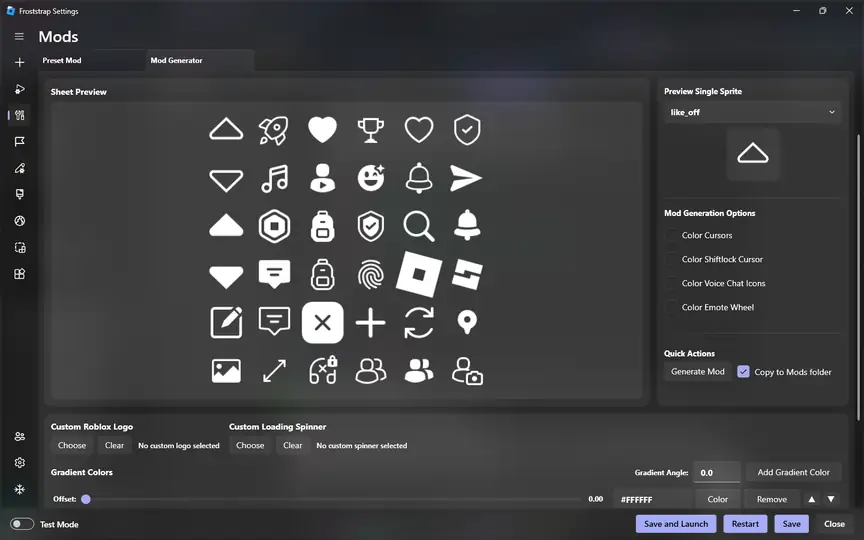
Players use Froststrap for interface customization, mod generation, server-region selection, game shortcuts, Rich Presence, account switching, and selected client settings. Features can change between releases, so the current GitHub repository and release notes remain the authoritative source.
Froststrap is not Roblox itself and does not provide a separate copy of a Roblox game. You still need a supported Windows computer and a working Roblox account. Read our Froststrap for Roblox overview before installing if you are comparing bootstrappers.
Practical controls
The current project presents Froststrap as a lightweight, customizable bootstrapper. These are the major functions documented by its public website and repository.
Launch Roblox through a configurable open-source bootstrapper and manage supported client settings from one interface.
Prepare supported Roblox UI modifications without manually assembling every asset and folder. Follow the Froststrap mods guide for import, priority and rollback steps.
Adjust Froststrap's own appearance, including supported custom backgrounds and interface options.
Choose a preferred server region when that feature is available and appropriate for your connection.
Create shortcuts for faster entry into specific Roblox experiences instead of navigating from scratch.
Use Froststrap Rich Presence and supported account-management features with careful account security.
Four clear steps
The short installation path below covers a normal first setup. The full Froststrap installation guide includes Windows warnings, updates, and uninstall steps.
Use the verified button and wait for the GitHub Release redirect.
Confirm the filename and version match the details on this page.
Open the EXE and review any Windows security prompt before continuing.
Choose only settings you understand, save them, and launch Roblox.
Source verification
No independent website can guarantee that every executable is risk-free. The safer approach is to download only from the public Froststrap GitHub repository, compare the release tag and filename, keep Windows security tools enabled, and avoid third-party mirrors.
This site redirects to the asset published under Froststrap/Froststrap on GitHub. Read the full Froststrap safety and file-verification guide for checksum steps, warning interpretation and a clear explanation of what can—and cannot—be verified.
Froststrap/Froststrapv2.0.5Froststrap-windows-x64.msigithub.comBefore you switch
A bootstrapper is useful only when it fits your Windows setup and the way you use Roblox. Check the practical requirements before replacing a working launch flow.
Use an updated Windows 10 or Windows 11 computer that can already run the normal Roblox desktop client. You need a stable network connection for Roblox updates, enough permission to install and update applications, and access to the public GitHub Release. Froststrap does not provide Roblox access or bypass platform requirements.
Start with the latest stable Froststrap build and default options. Keep important custom settings documented, but do not import an old configuration before the first successful launch. If your computer is managed by a school, employer or family administrator, follow its software policy rather than bypassing restrictions.
Choose the normal launcher when you want the simplest supported setup and do not need bootstrapper customization. Consider Froststrap when you understand its independent status and specifically want its configuration, mod, shortcut, region or Rich Presence features.
No bootstrapper can guarantee better FPS, lower ping or permanent access to a Roblox setting. Performance depends on hardware, network conditions, the experience you join and current Roblox behavior. Avoid claims that one “strap” automatically fixes every performance problem.
Froststrap download for Roblox on Windows should always be traceable to the public project repository, a named release tag and a matching executable asset. Check those three details before each installation or update. The current version shown on this page is useful context, but the GitHub Release remains authoritative during the short period when a new build is being published and caches are updating.
Keep the original filename until verification is complete, leave Windows protection enabled and avoid third-party download managers. After a Froststrap download finishes, launch once with default settings and confirm Roblox works before importing mods, channels or flags. This routine gives you a known baseline and makes later troubleshooting far more precise.
The same Froststrap download routine applies when a social post or video links directly to an installer. Navigate back to the repository, verify the organization and release, then obtain the public asset yourself. A familiar Froststrap logo or filename is not a substitute for checking the source.
Common blockers
Start with the smallest fix: confirm you have the current release, close Roblox, restart Froststrap, and review the setting that changed immediately before the problem appeared.
Check channel availability, permissions, configuration state, and update status.
StartupWork through Windows security, file integrity, network, and clean-start checks.
VerificationLearn how tags, assets, release notes, and source code relate to the download.
Straight answers
Froststrap is an open-source Roblox bootstrapper in the Bloxstrap and Fishstrap family. It adds launch, configuration and customization tools around a normal Roblox installation.
Use the download button on froststrap.wiki or open the Froststrap/Froststrap Releases page on GitHub. This site redirects to the executable attached to the project's public latest release and does not host a mirror.
The current Froststrap installer is distributed as a Windows executable. Windows 10 users should keep the operating system updated, verify the release filename and review any security prompt before running it.
No. Froststrap describes itself as a fork in the Bloxstrap/Fishstrap family. The projects can share concepts and ancestry, but their maintainers, releases and available features may differ.
No. froststrap.wiki is an independent download and setup guide. The project repository and its release pages on GitHub are the authoritative sources for code and downloads.
The short countdown gives you time to verify the version, filename and destination before leaving this independent guide for the official GitHub Release asset.
Verified GitHub Release
You will be redirected to the Froststrap project's public GitHub Release. Keep this page open until the countdown finishes.